A log of articles I found for later reading. ...................................................... ..............................Not necessarily my point of view though.

Showing posts with label Computing. Show all posts

Friday, January 23, 2009

Steve Ballmer’s Entire Memo to the Microsoft Troops About Layoffs and Weak Results

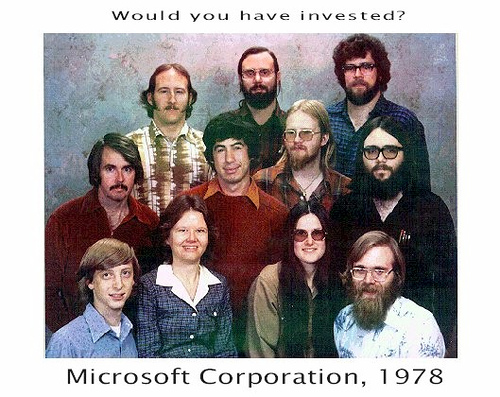
Here is the full memo to employees from Microsoft CEO Steve Ballmer (pictured here) about the 5,000 layoffs and other cost cuts just announced, due to economic slowdown, which also resulted in weak financial results for the second quarter.

It is not a happy missive, obviously.

But tough times have also hit Microsoft (MSFT).

“…We believe these job eliminations are crucial to our ability to adjust the company’s cost structure so that we have the resources to drive future profitable growth,” wrote Ballmer, in part.

But read it for yourself below in its entirety:

From: Steve Ballmer
To: All Microsoft FTE
Subject: Realigning Resources and Reducing Costs

In response to the realities of a deteriorating economy, we’re taking important steps to realign Microsoft’s business. I want to tell you about what we’re doing and why.

Today we announced second quarter revenue of $16.6 billion. This number is an increase of just 2 percent compared with the second quarter of last year and it is approximately $900 million below our earlier expectations.

The fact that we are growing at all during the worst recession in two generations reflects our strong business fundamentals and is a testament to your hard work. Our products provide great value to our customers. Our financial position is solid. We have made long-term investments that continue to pay off.

But it is also clear that we are not immune to the effects of the economy. Consumers and businesses have reined in spending, which is affecting PC shipments and IT expenditures.

Our response to this environment must combine a commitment to long-term investments in innovation with prompt action to reduce our costs.

During the second quarter we started down the right path. As the economy deteriorated, we acted quickly. As a result, we reduced operating expenses during the quarter by $600 million. I appreciate the agility you have shown in enabling us to achieve this result.

Now we need to do more. We must make adjustments to ensure that our investments are tightly aligned with current and future revenue opportunities. The current environment requires that we continue to increase our efficiency.

As part of the process of adjustments, we will eliminate up to 5,000 positions in R&D, marketing, sales, finance, LCA, HR, and IT over the next 18 months, of which 1,400 will occur today. We’ll also open new positions to support key investment areas during this same period of time. Our net headcount in these functions will decline by 2,000 to 3,000 over the next 18 months. In addition, our workforce in support, consulting, operations, billing, manufacturing, and data center operations will continue to change in direct response to customer needs.

Our leaders all have specific goals to manage costs prudently and thoughtfully. They have the flexibility to adjust the size of their teams so they are appropriately matched to revenue potential, to add headcount where they need to increase investments in order to ensure future success, and to drive efficiency.

To increase efficiency, we’re taking a series of aggressive steps. We’ll cut travel expenditures 20 percent and make significant reductions in spending on vendors and contingent staff. We’ve scaled back Puget Sound campus expansion and reduced marketing budgets. We’ll also reduce costs by eliminating merit increases for FY10 that would have taken effect in September of this calendar year.

Each of these steps will be difficult. Our priority remains doing right by our customers and our employees. For employees who are directly affected, I know this will be a difficult time for you and I want to assure you that we will provide help and support during this transition. We have established an outplacement center in the Puget Sound region and we’ll provide outplacement services in many other locations to help you find new jobs. Some of you may find jobs internally. For those who don’t, we will also offer severance pay and other benefits.

The decision to eliminate jobs is a very difficult one. Our people are the foundation of everything we have achieved and we place the highest value on the commitment and hard work that you have dedicated to building this company. But we believe these job eliminations are crucial to our ability to adjust the company’s cost structure so that we have the resources to drive future profitable growth.

I encourage you to attend tomorrow’s Town Hall at 9am PST in CafĂ© 34 or watch the webcast.

While this is the most challenging economic climate we have ever faced, I want to reiterate my confidence in the strength of our competitive position and soundness of our approach.

With these changes in place, I feel confident that we will have the resources we need to continue to invest in long-term computing trends that offer the greatest opportunity to deliver value to our customers and shareholders, benefit to society, and growth for Microsoft.

With our approach to investing for the long term and managing our expenses, I know Microsoft will emerge an even stronger industry leader than it is today.

Thank you for your continued commitment and hard work.

Steve

via http://kara.allthingsd.com/20090122/steve-ballmers-entire-memo-to-the-microsoft-troops-about-layoffs-and-weak-results/

Thursday, January 22, 2009

Tracing the attack - Part I

Intro

In this post I will talk about some of the techniques used to attack systems, and some solutions that can reduce much the number of attacks that a system may suffer. A vision to the attack from scanning to gain root in one system.
This work is a continuation of my work on honeypots. The attacks presented here could be seen in a honeypot of high activity, real systems that have known vulnerabilities. Unfortunately I used one low activity honeypot in previous posts, emulation of vulnerabilities, so I just could not get to identify some of the attacks mentioned herein.

Starting

First let me talk about the profile of the principal threat that we face from the moment
we use the Internet, the Script Kiddie.
To a Script Kiddie not interest who is he attacking, its only purpose is to gain root access in a machine. The problem is that for helping him he has several tools that automate all the process, the only thing that usually has to do is put the tool to scan the entire Internet.
Sooner or later it is guaranteed that he will get access in some machine.
The fact that these tools are becoming more known ally to randomness searches, this threat is extremely dangerous because it is not “if” but “when” we will be victims of a search.

I introduced the “who”, now let me introduce the “how”. Before starting any type of attack, the enemy must find that machines are online and their ports (services) that are open to the outside.
This technique is called Port Scanning

Port Scanning

Port Scanning is used both by system administrators and by attackers, the first thing to determine the level of security of their machines; seconds to find the vulnerabilities as I said before.
I will give special focus to this technique because it domain is essential in both situations.

Basically a Port Scan is send a message to each port of a machine and depending on what kind of response we get determine the status of the port.

These possible state ports are:

  • Open or Accepted: The machine has sent a response to indicate that a service that is listening port
  • Closed, Denied or Not Listening: The machine has sent a response to indicate that any connection the port will be denied
  • Filtered, Dropped or Blocked: There was no response from the machine

Just a note on the legality of this technique: in fact Port Scanning can be seen as a bell to ring to confirm if someone is home. Nobody can be accused of nothing just for doing a Port Scan. Now if we are playing constantly on the bell, could be alleged the similarity to a denial of service (for more about legal issues related to Port Scanning).

Now we are ready to see the most popular techniques in Port Scanning.

TCP SYN scan

The SYN scan is the most popular because it can be done in a very quick way, searching thousands
of ports per second on a network (fast network and without firewalls). This kind of scan is relatively discreet because they never complete TCP connections. It also allows a distinct differentiation between the states of ports with a good confidence.
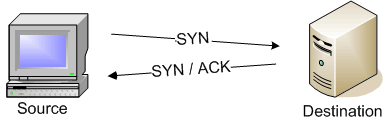
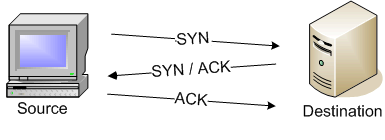
This technique is also known as semi-open scan because it never gets to open a complete TCP connection. It is sent a SYN packet (the beginning of a normal complete connection) and expects a answer. If it receives a SYN/ACK, the port is Open, if it receives a RST, the port is Closed, and if there is no response after several retransmissions of the SYN, the port is marked as Filtered.
This last scenario repeats itself in the event of an ICMP Unreachable Error.

Normal scenario (client send a SYN, server reply with SYN/ACK, and client send an ACK):

TCP SYN attack (client send a SYN, server reply with SYN/ACK, and client do nothing):

This technique is used when the user does not have privileges to create crude packets (in nmap for example, you must have root privileges to this option.) Rather than be sent in “custom” packets as in all other techniques mentioned here, it established a complete TCP connection in the target machine port. This causes a considerable increase of time for giving same information as the previous technique (most packets are produced). In addition, most operative systems log these connections, because it is not a quick or silent scan. On Unix, for example, is added an entry in syslog.

UDP scan

A UDP scanis much slower than a TCP one, one of the reasons why many systems administrators ignore the security of these ports, but not the attackers.
This technique consists in sending an empty UDP header (no data) to all target ports. If an ICMP Unreachable Error is returned, depending on type and code of error is given the port state (Closed or Filtered). However if returned another UDP header, then the port is Open, if not received any response after the retransmissions of the header, the port is classified as a combination of Open or Filtered because may be in a state or in the other.

But as I said the greatest disadvantage of this technique is the time spent on scan; Open or Filtered ports rarely respond which can lead to several retransmissions (because it is assumed that the packet could have been lost). Closed ports are an even bigger problem because normally respond with ICMP Unreachable Errors and many operative systems limit the frequency of ICMP packets transmission, as a example in Linux that normally limited to a maximum of one package per second.

Faced with such constraints, if we were to the full range of ports of a machine (65536 ports) it will take more than 18 hours. Some optimizations can pass through the more common ports.

There are many others techniques used in Port Scanning (more information: here) but this ones come to show the behavior of this type of scan. It is easy to see why it is a critical process for an attacker methodology. For the correct identification of the target, only one technique can not be the most appropriate/enough.
So the Port Scanning area is not only making TCP SYN scans.
The tool I recommend to Port Scanning is the Nmap because it supports all these techniques that I said, and a lot more. This tool is being actively developed, and the author Gordon “Fyodor” Lyon is a guru in this area and highly responsible for the constant development of it.

For more information about Port scanning go to Nmap page explaining Port Scanning Techniques.

Gain access to the machine

At this time the attacker already has a huge list of reachable machines and services. Now to get remote access on a machine, in essence, we can use two techniques: brute-force/password dictionaries (see the Infinite monkey theorem).

It may seem silly but it is still heavily used in services such as SSH. As you can see in your /var/log/auth.log file…

Dec 24 01:24:46 kubos sshd[23906]: Invalid user oracle from 89.235.152.18
Dec 24 01:24:46 kubos sshd[23906]: pam_unix(ssh:auth): check pass; user unknown
Dec 24 01:24:46 kubos sshd[23906]: pam_unix(ssh:auth): authentication failure; logname= uid=0 euid=0 tty=ssh ruser= rhost=89.235.152.18
Dec 24 01:24:48 kubos sshd[23906]: Failed password for invalid user oracle from 89.235.152.18 port 48785 ssh2
Dec 24 01:24:49 kubos sshd[23908]: reverse mapping checking getaddrinfo for 89-235-152-18.adsl.sta.mcn.ru [89.235.152.18] failed - POSSIBLE BREAK-IN ATTEMPT!

Dec 24 01:26:01 kubos sshd[23963]: Invalid user test from 89.235.152.18
Dec 24 01:26:01 kubos sshd[23963]: pam_unix(ssh:auth): check pass; user unknown
Dec 24 01:26:01 kubos sshd[23963]: pam_unix(ssh:auth): authentication failure; logname= uid=0 euid=0 tty=ssh ruser= rhost=89.235.152.18
Dec 24 01:26:04 kubos sshd[23963]: Failed password for invalid user test from 89.235.152.18 port 57886 ssh2
Dec 24 01:26:05 kubos sshd[23965]: reverse mapping checking getaddrinfo for 89-235-152-18.adsl.sta.mcn.ru [89.235.152.18] failed - POSSIBLE BREAK-IN ATTEMPT!

Dec 24 01:26:21 kubos sshd[23975]: Invalid user cvsuser from 89.235.152.18
Dec 24 01:26:21 kubos sshd[23975]: pam_unix(ssh:auth): check pass; user unknown
Dec 24 01:26:21 kubos sshd[23975]: pam_unix(ssh:auth): authentication failure; logname= uid=0 euid=0 tty=ssh ruser= rhost=89.235.152.18
Dec 24 01:26:22 kubos sshd[23975]: Failed password for invalid user cvsuser from 89.235.152.18 port 59883 ssh2
Dec 24 01:26:24 kubos sshd[23977]: reverse mapping checking getaddrinfo for 89-235-152-18.adsl.sta.mcn.ru [89.235.152.18] failed - POSSIBLE BREAK-IN ATTEMPT!


And these are just some of the hundreds of attempts that it recorded.

I will then present some strategies for protection against these attacks:


Use strong passwords


This section may seem ridiculous but the fact that this type of attack is used demonstrates the lack of choice of passwords culture.

Here are some requirements to define a strong password in today times:


  • A password should have, a minimum of 8 characters


  • If the password can be found in a dictionary is trivial and is not good. Attackers have large dictionaries of words in different languages (via IP, for example, can determine the dictionary to use)


  • As trivial variations of trivial passwords, such as “p4ssword” is almost as bad as “password” in a dictionary attack but is substantially better in an brute-force attack


  • The password should ideally be a combination of symbols, numbers, uppercase and lowercase


  • Mnemonic are easy to remember (even with special symbols) and this is the best kind of passwords, such as “Whiskey-Cola is EUR 3 in Academic Bar!” = “W-CiE3iAB!” (this password is Very String according to The Password Meter)


The fact is, using strong passwords can prevent the success of the attempt but not prevent the numerous attempts that are made consistently. And in an extreme situation might be suffering Denial of Service attacks (it is imperative to avoid this on a machine whose purpose is to offer the service to the outside).


Not mentioned the fact that we can limit the number of connections established in the port 22 (SSH) through iptables.


Using iptables to mitigating the attacks


We can limiting the access to a single source:


iptables -A INPUT -m state --state NEW -m tcp -p tcp -s 192.168.1.100 --dport 22 -j ACCEPT


The -s flag is used to indicate the source host ip.

We can also restrict the access to some sub-net, or some IP class address with this flag:


iptables -A INPUT -m state --state NEW -m tcp -p tcp -s 192.168.1.0/24 -dport 22 -j ACCEPT


If we want access our machine from everyware we might want to limit our server to accept, for example, 2 connections per minute:


iptables -N SSH_CONNECTION -A INPUT -m state --state NEW -p tcp --dport 22 -j SSH_CONNECTION -A SSH_CONNECTION -m recent --set --name SSH -A SSH_CONNECTION -m recent --update --seconds 60 --hitcount 3 --name SSH -j DROP


We can create a new chain called SSH_CONNECTION. The chain uses the recent module to allow at maximum two connection attempts per minute per IP.


RSA authentication


To avoid the use of passwords, we can use a pair of RSA keys completely avoiding brute-force/dictionaries attacks.

To do this we will do the following steps:


Generate the key pair with the command


ssh-keygen-t rsa


This command create the files:

~/.ssh/id_rsa (private key) and ~/.ssh/id_rsa.pub (public key).


In each machine where we want to connect (target), put the “id_rsa.pub” generated in ~/.ssh/authorized_keys concatenate the contents of this form for example:


cat id_rsa.pub >> ~/.ssh/authorized_keys


In each machine where we want to call (home), put the “id_rsa” in ~/.ssh/

Only missing off the password-based login to add the line “PasswordAuthentication no” in /etc/ssh/sshd_config and then restart the daemon “sshd” through:


/etc/init.d/sshd restart


Exploitation of vulnerabilities


Now that we reduce the chances of being attacked, let’s see another way that attackers use to gain access into a system.

Exploit is the name given to a piece of code used to exploit flaws in applications in order to cause a behavior not previously anticipated in them. Thus is common, for example, gaining control of a machine or spread privileges.


A widely used type of exploit is stack smashing which occurs when a program writes a memory address outside their allocated space for the structure of data in the stack, usually a buffer of fixed size. Take a very simple example of local implementation of this exploit:


# include
# include

int main(int argc , char *argv []) {
char buffer [10];
strcpy (buffer ,argv [1]);
printf ( buffer );
return 0;
}


When we try to execute the above code, we get:


user@honeypot :~$ gcc exploit .c -o exploit
user@honeypot :~$ ./ exploit thisisanexploit
*** stack smashing detected ***: ./ exploit terminated
thisisanexploitAborted


As we can see, GCC has introduced mechanisms for blocking implementation of code potentially malicious. But this example is as simple as possible. More sophisticated attacks against systems can avoid this mechanisms.


The stack


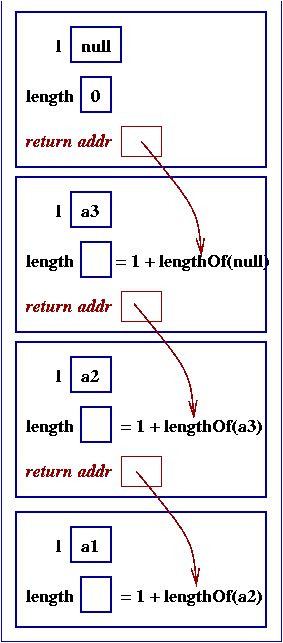
When a function is called, the return value must be addressed, and it address must be somewhere saved in the stack. Saving the return address into the stack is one advantage, each task has its own stack, so each must have its return address. Another thing, is that recursion is completely supported. In case that a function call itself, a return address must be created for each recursive phase, in each stack function call.

For example, the following code:


/** lengthOf  returns the length of list  l  */
public int lengthOf(Cell l) {
int length;

if ( l == null ) {
length = 0;
}
else {
length = 1 + lengthOf(l.getNext());
}
return length;
}


Will produce the following stacks:


The stack also contain local data storage. If any function declare local variables, they are stored there also. And may also contain parameters passed to the function, for more information about that.


GCC and Stack canary’s


If you wondering why a canary.


GCC, and other compilers insert in the stack known values to monitor buffer overflows. In the case that the stack buffer overflows, the first field to be corrupted will be the canary. Forward, the sub-routines inserted into the program by GCC verify the canary field and verify that this as changed, sending a message “*** stack smashing detected ***”.


For more information about this subject.


Stack corruption


If you still thinking what stack buffer overflow is god for? I give you a simple example (from Wikipedia article).

Imagine you have the following code:


void foo (char *bar)
{
char c[12];

memcpy(c, bar, strlen(bar)); // no bounds checking...
}

int main (int argc, char **argv)
{
foo(argv[1]);
}


As you can see, there are no verification about the input of the function foo, about the *bar variable.

This is the stack that are created at some point when this function is called by another one:


When you call the foo, like:


void function() {
char *newBar = (char *)malloc(sizeof(char)*6);
strcpy(newBar,"hello");
foo(newBar);
}


This is what happens to the stack:


Now, if you try this:


void function() {
char *newBar = (char *)malloc(sizeof(char)*24);
strcpy(newBar,"A​A​A​A​A​A​A​A​A​A​A​A​A​A​A​A​A​A​A​A​\x08​\x35​\xC0​\x80");
foo(newBar);
}


This is what happens to the stack:


So, now, when the foo function terminates, it will pop the return address and jump to that address (0×08C03508, in this case), and not to the expected one. In this iamge, the address 0×08C03508 is the beginning of the char c[12] code. Where the attacker can previously put shellcode, and not AAAAA string…


Now imagine that this program is SUID bit on to run as root, you can instantly scale to root…


Fortunately this kind of attacks is being to reduce, since the introduction of stack canary’s. This kind of protection is possible because the stack is not dynamic, but as we gone see later (in part II), the heap is.


via http://ulissesaraujo.wordpress.com/2009/01/21/random-attacks-part-i/

Alan Kay: Is Computer Science an Oxymoron?

Alan Kay’s title slide, up during the intro says Is the Best Way to Predict the Future to {Invent,Prevent} It? with the {Invent,Prevent} alternating between each other. He jokes that this afternoon’s talk can be summed up by the fact that he has to wear two microphones to speak instead of one. The talk was billed as “Software Engineering vs. Computer Science, so I’m anxious to see how his title relates to that. I have some more photos too. Alan Kay

Much of what is wrong about our field is that many of the ideas that happened before 1975 are still the current paradigm. He has a strong feeling that our field has been mired for some time, but because of Moore’s law, there are plenty of things to work on. The commercialization of personal computing was a tremendous distraction to our field and we haven’t, and may not, recover from it.

Almost nothing exciting about computing today has to do with data structures and algorithms One of Alan’s undergraduate degrees is in molecular biology. He can’t understand it anymore despite having tried to review new developments every few years. That’s not true in computer science. The basics are still mostly the same. If you go to most campuses, there is a single computer science department and the first course in computer science is almost indistinguishable from the first course in 1960. They’re about data structures and algorithms despite the fact that almost nothing exciting about computing today has to do with data structures and algorithms.

The Internet is like the human body. It’s replaced all of its atoms and bits at least twice since it started even though the Internet has never stopped working. Attacks on the ‘Net aren’t really attacks on the ‘Net, they’re attacks on machines on the ‘Net. Very few software systems, maybe none, are built in ways that sustain operation in spite of being continually rebuilt and continually growing.

The future five years out is easy to predict because all of the forces acting on computer science are trying to keep it the same as it is now. Likely, the future will be more of what we have now.

Are computer science, software engineering, OOP, etc. oxymorons? Alan reminisce about Bob Barton, an early Utah professor. Bob said that “systems programmers are the high priests of a low cult” and “there are few things know about systems design, but the basic principle of recursive design is: make the parts of the same power as the whole. Bob Barton has a classic paper that contains seven of the most important things that people know about software today. Another quote: “My job is to disabuse you of any firmly held notion you held when you came into this classroom.” The best way to get people to think is to destroy their current thinking. Preconceived notions are largely reactions to what vendors are saying. Alan says that his course from Barton was the most valuable one he took in college because Barton garbage collected their minds.

Engineers should read a book about how the Empire State building was done. Including the demolition of the building on the site before, the Empire State building was built in 11 months by 3000 people. We don’t know how to do this in computing. Whatever we think engineering is, it can’t mean the modern use of the term. I don’t know of a single computing system that is attached to you that if it fails it will almost certainly kill you. That’s what happens with jet engines. That’s engineering

Hurricane Katrina is Alan’s new favorite story. When the city started flooding only four pumps kept pumping until the levee actually broke. The youngest pump that kept going was made in 1929. The newer pumps all stopped well before that. Try to imagine a computing system that will be working 90 years from now? It’s impossible to imagine.

“American’s have no past and no future, they live in an extended present.” This describes the state of computing. We live in the 80’s extended into the 21st century. The only thing that’s changed is the size. Windows XP has 70 million lines of code. It’s impossible for Alan to believe that it has 70 million lines of content. Microsoft engineers don’t dare prune it because they don’t know what it all does. Cathedrals have 1 millionth the mass of pyramids. The difference was the arch. Architecture demands arches.

Computers are artifacts. in order to have a science of computing, we have to make them. This isn’t unheard of. To have a science of bridge building, people had to start building them so they could be studied. He shows a clip of the Tacoma Narrows bridge. After studying the failure, the bridge was rebuilt and hasn’t come down. This reminds Alan of software systems. We’re much better at building software systems than we are at predicting what they will do. There are no good models. If we were scientists, we’d be trying to build models.

“Science is not there to tell us about the Universe, but to tell us how to talk about the Universe.” (Niels Bohr). Science helps us to be more reasonabler about reasoning. It’s set up so that we get better and better maps (abstractions) not perfect maps.

Alan uses John McCarthy and Lisp as an example of real science in computer science. He showed us that you can build a system that’s also it’s own metasystem. Lisp is like Maxwell’s equations. Many of the things that are wrong about Java is that it lacks a metasystem and that the metasystem that’s been tacked onto it is missing key parts. To find the most interesting things about our field you have to go back 30 or 40 years.

Alan used McCarthy’s method to design an object oriented system. He spent only a month implementing it because of the metasystem.

We build finite artifacts, but the degrees of freedom grow faster than we can reason about them. Thus, we’re left with debugging.

We are creatures who live in a world of stories and we’re always looking for simple stories o explain the world. He shows a clip, called Private Universe, of Harvard grads (at graduation) describing trying to explain the seasons. Almost everyone thought the seasons were caused by an elliptical orbit of the earth around the sun. It didn’t matter whether or not the students were science majors or now. Interestingly, people know that the seasons are reversed between the northern and southern hemispheres. Their stories are inconsistent with what they know, yet they persist in believing them, even though they have the knowledge that contradicts their theory.

When people react instantly, they’re not thinking, they’re doing a table lookup.

Engineering predates science by thousands and thousands of years because we don’t have to understand things to engineer them. He uses one of my favorite quotes: an engineer is someone who can make for a dollar what any fool could make for two.

Making computing into a science means that we have to understand what to do about our beliefs. When we talk, we do nothing but tell stories that people will find interesting. There’s danger in that because stories can create resonance without being scientific.

Handwritten books were prohibitively expensive. Guttenberg’s books only cost “2 to 3 times a clerks yearly wage.” Aldus Manutius created portable books. He measured saddle bags. It had to be cheap so that loosing it wasn’t a tragedy. What made the big change was that people discovered you could argue effectively with books. This took centuries. There’s a big gap between a technology and its powerful media. The real revolution isn’t a revolution in technology, but a revolution in thought.

Imitating paper on digital media isn’t the real computer revolution. What is the real computer revolution? The only reason personal computers look like they do is that we thought of them as time sharing terminals (which look like typewriters with screens) without the mainframe. Alan’s epiphany was that computers don’t have to look like that.

PowerPoint is a terrible idea PowerPoint is a terrible idea because it takes everything interesting about what computers can do and brings it into an expensive form of paper. Alan now jumps into a demo of the system he’s using that isn’t PowerPoint. He draws a car and then animates it with a script. This is based on what children do with his system, Squeak.

He discusses the power of parallel programs and loose coupling for building systems. We need to teach these concepts more than data structures and algorithms.

Squeak is written in 230,000 lines of Smalltalk. They think it could be 20,000. There are 59,000 methods in 3.5Mb of object code, for about 59 bytes per method. There are about 5 million objects and it was implemented by ten people. The system is self-bootstrapping, so it’s all in there. Learning how to do this ought to be part of computer science but regrettably it’s not.

Q: What are one or two things we can do to be better computer scientists?

A: A lot of the success at PARC was because we didn’t know what we were doing—specifically, we weren’t trying to make a product. The silliest thing you can find at research university is today’s laptop. We invented the Alto and it allowed us to do things that weren’t commercially viable until the 80’s. A research computer is two cubic feet of the fastest computing on the planet. You make it, then you figure out what to do with it. How do you program it? That’s your job! Because real thinking takes a long time, you have to give yourself room to do your thinking. One way to buy time is to use systems not available to most people.

UCLA has one computer science department, but 25 full departments of biology (not counting medical school stuff). Why? Biologists are smarter then we are. When things are bogging down, the best thing to do is to go create a new department. To do creative work in computing, you must get past what you think is normal. Write down the 20 things you think are true of computing and try to demolish them.

Q: Are all the video codecs in the stats you give for Squeak?

A: Yes, it’s self bootstrapping. The problem with Java is that it’s a paper spec. Squeak is defined in Smalltalk, as a simulation. It takes less than two days to port Squeak to a new piece of hardware. This Smalltalk book shows how the VM can be created in itself. This is the metasystem.

Lisp is the most important idea in computer science. The good guys (late binders) lost in the late 70’s. The early binders won.

Good ideas don’t often scale.

Most people who graduate with CS degrees don’t understand the significance of Lisp. Lisp is the most important idea in computer science. Alan’s breakthrough in object oriented programming, wasn’t objects, it was the realizing the the Lisp metasystem was what we needed.

Q: What do you mean by “object” and “object oriented system?”

A: In 1966, the thing that knocked me over was that Sketchpad was maintaining dynamic relationships. That’s the key to building large system. The other thing that happened in 1966 was thinking about the ARPANet. The idea of having a million machines without any central control. Simula provided a programming form of what SketchPad was doing. My background in biology and math led me to think about algebra and tissues. Barton taught me “The basic principle of recursive design is making the parts as powerful as the whole.” These ideas led me to an insight on November 11, 1966: the timesharing people got it right with processes, but it was too big.

The interesting thing about the object idea is that it’s everywhere. The perversity of science is that world doesn’t change just because we get a different perspective of it.

The secret of PARC’s success was to design the best virtual machine we could and then to build hardware that optimized that. We’ve got that concept backwards today.

via http://www.windley.com/archives/2006/02/alan_kay_is_com.shtml

Monday, January 19, 2009

Computer Network Routers, Hubs, and Switches

When computer networks are working well, which we hope is most of the time, the inner workings of the system modules are transparent to the average user. The most common components on a computer network, not counting cables, are "routers", "hubs", and "switches". Many of these modules can be similar cosmetically. Each assembly typically has Ethernet connectors (RJ45, which looks like an oversized telephone plug) and LED indicators. However, these modules function differently, and it is important to understand the differences.

Modern network hardware operates on the "Open System Interconnection" (OSI) standard. This standard defines how communications on a network should be implemented. By conforming to this standard, modules from different manufacturers can coexist on the same network. Wireless networks (WiFi) and the 802.11X standard are an additional subset of network systems.

When a message is sent between computers, it is broken into parts. At the base level, the message is reduced to "1" and "0" bits. The next level is a group of bits called a "frame". A frame contains its control information, including target address and error detection. The next level is a group of frames called a "packet". The terms frame and packet are sometimes used interchangeably. If a message is sent on a complex network like the Internet, some of the packets may take a different path, and be recombined at the destination.

Error detection is used with both frames and packets. The most common routine is called "Cyclic Redundancy Check" (CRC). CRC sums of all the "1"s in the frame or packet. This number is stored as a hexadecimal value at the end of the frame/packet.   At the receiving end, the process is repeated. If the two hexadecimal values agree, the test passes. If not, the receiving device requests that the sending device resend. Most of this functionality is performed by integrated circuits (chips) inside the network modules.

The Hub

The network hub operates on the first layer of the OSI standard, called the "physical layer". The hub is the most simple of the three modules. A hub is not aware of the contents of the message that is processed; it handles the message as bits. It simply records the signal, and rebroadcast it to all, including back to the port that sent the message. An "active" hub will clean the electrical signal of noise and amplify the signal before rebroadcast. A "passive" hub does not amplify the received signal; it merely receives a signal, and rebroadcast the signal as received to each port. Hubs are sometimes used to link multiple computers with a printer.

The Network Switch

The network switch operates on the second layer of the OSI standard, called the "data link layer". The network switch, as indicated by its name, switches signal paths, so that a message frame goes to a specific destination. A switch will improve a networks performance, especially on networks with many computers. A switch has enough on-board intelligence to remember the path to each destination. The network switch handles a message in frames.

When you connect a computer to a network switch, the switch will record the Media Access Control or “MAC” address of the computer's network interface card (NIC). This is called address protocol, or "ARP". When a frame is received intended for a specific computer, the switch sends the frame only to that computer. By preventing paths of the network from being utilized by every frame, network resources are conserved. Computer A can send a frame to computer B, while simultaneously, computer C is sending a frame to computer D.

The Network Router

The network router operates on the third layer of the OSI standard, called the "network layer". A router's name is also indicative of its role. Routers have some of the same capabilities as switches, but routers are most often used to connect two or more networks. For example, a router could be used to connect a wireless network with a conventional local area network (LAN). Another common use is to connect a LAN with the Internet (a "wide-area network", or "WAN"). In this role, the router uses "Network Address Translation" (NAT) so that all of the computers attached to the LAN can share a single IP address. A network router handles the message in packets. A router uses the IP addresses in the packets to route them between multiple networks.

A personal computer can be configured to handle the function of a router if it is equipped with router software and two or more network interface cards (NIC). A separate NIC is needed for each network.

A router is capable of advanced functions, including serving as DHCP (domain host control protocol) server and Firewall. A Firewall protects computers from potential hazards from the other computers outside the network. Linking multiple networks often requires the conversion of protocols.

A router is an extremely diverse classification. Routers may provide connectivity inside offices, between different locations, and between businesses and the Internet. The largest routers connect Internet service providers, are used in very large business networks, or connect a business with a satellite link to a distant corporate locale. Advanced routers are powerful computers, complete with microprocessors. Very sophisticated routers are used by the Internet to manage the network traffic most efficiently.

A router maintains a table called “routing information base” (RIB) that tracks information about the available routes. The RIB can be static (manually determined by a network administrator) or dynamic (continually updated based on changing conditions). A RIB is simple on a small LAN, but can be extremely complex in the very large routers used on the Internet.

Summary

There are more types of network modules than the three discussed here, and there can be significant overlap in roles. For example, an "intelligent hub" can have many of the characteristics of a network switch. Wireless networks (WAN) have much in common with their conventional LAN cousins, but additional protocol is added for the special security and interference concerns specific to wireless networks. Multiple roles may be combined into a single assembly. Network routers sometimes have subassemblies that function as network switches. 

About the Author: Brian Bradshaw is a Certified Technical Specialist (InfoComm CTS) and CompTIA A+ Computer Technologist. Areas of expertise include Video, Audio, Computation, WiFi, HDTV, VSAT Satellite Systems, and Communications. He has a communications technology business that serves the Southwestern United States with offices in Plano, Texas (Dallas) and an office in Peoria, Arizona (Phoenix), managed by his brother, Keller Bradshaw.

via http://ezinearticles.com/?Computer-Network-Routers,-Hubs,-and-Switches&id=1878202

Wednesday, January 14, 2009

Martian Headsets

You’re about to see the mother of all flamewars on internet groups where web developers hang out. It’ll make the Battle of Stalingrad look like that time your sister-in-law stormed out of afternoon tea at your grandmother’s and wrapped the Mustang around a tree.

This upcoming battle will be presided over by Dean Hachamovitch, the Microsoft veteran currently running the team that’s going to bring you the next version of Internet Explorer, 8.0. The IE 8 team is in the process of making a decision that lies perfectly, exactly, precisely on the fault line smack in the middle of two different ways of looking at the world. It’s the difference between conservatives and liberals, it’s the difference between “idealists” and “realists,” it’s a huge global jihad dividing members of the same family, engineers against computer scientists, and Lexuses vs. olive trees.

And there’s no solution. But it will be really, really entertaining to watch, because 99% of the participants in the flame wars are not going to understand what they’re talking about. It’s not just entertainment: it’s required reading for every developer who needs to design interoperable systems.

The flame war will revolve around the issue of something called “web standards.” I’ll let Dean introduce the problem:

All browsers have a “Standards” mode, call it “Standards mode,” and use it to offer a browser’s best implementation of web standards. Each version of each browser has its own Standards mode, because each version of each browser improves on its web standards support. There’s Safari 3’s Standards mode, Firefox 2’s Standards mode, IE6’s Standards mode, and IE7’s Standards mode, and they’re all different. We want to make IE8’s Standards mode much, much better than IE7’s Standards mode.

And the whole problem hinges on the little tiny decision of what IE8 should do when it encounters a page that claims to support “standards”, but has probably only been tested against IE7.

What the hell is a standard?

Don’t they have standards in all kinds of engineering endeavors? (Yes.)

Don’t they usually work? (Mmmm…..)

Why are “web standards” so frigging messed up? (It’s not just Microsoft’s fault. It’s your fault too. And Jon Postel’s (1943-1998). I’ll explain that later.)

There is no solution. Each solution is terribly wrong. Eric Bangeman at ars technica writes, “The IE team has to walk a fine line between tight support for W3C standards and making sure sites coded for earlier versions of IE still display correctly.” This is incorrect. It’s not a fine line. It’s a line of negative width. There is no place to walk. They are damned if they do and damned if they don’t.

That’s why I can’t take sides on this issue and I’m not going to. But every working software developer should understand, at least, how standards work, how standards should work, how we got into this mess, so I want to try to explain a little bit about the problem here, and you’ll see that it’s the same reason Microsoft Vista is selling so poorly, and it’s the same issue I wrote about when I referred to the Raymond Chen camp (pragmatists) at Microsoft vs. the MSDN camp (idealists), the MSDN camp having won, and now nobody can figure out where their favorite menu commands went in Microsoft Office 2007, and nobody wants Vista, and it’s all the same debate: whether you are an Idealist (”red”) or a Pragmatist (”blue”).

Let me start at the beginning. Let’s start by thinking about how to get things to work together.

What kinds of things? Anything, really. A pencil and a pencil sharpener. A telephone and a telephone system. An HTML page and a web browser. A Windows GUI application and the Windows operating system. Facebook and a Facebook Application. Stereo headphones and stereos.

At the point of contact between those two items, there are all kinds of things that have to be agreed, or they won’t work together.

I’ll work through a simple example.

Imagine that you went to Mars, where you discovered that the beings who live there don’t have the portable music player. They’re still using boom boxes.

You realize this is a huge business opportunity and start selling portable MP3 players (except on Mars they’re called Qxyzrhjjjjukltks) and compatible headphones. To connect the MP3 player to the headphones, you invent a neat kind of metal jack that looks like this:

Picture of a stereo headphone jack

Because you control the player and the headphone, you can ensure that your player works with your headphones. This is a ONE TO ONE market. One player, one headphone.

[1] to [1]

Maybe you write up a spec, hoping that third parties will make different color headphones, since Marslings are very particular about the color of things that they stick in their earlings.

...may not touch the connecting block f, an insulating washer g, is placed under the screw and washer h. The insulating washer is made large enough so that there will be no stray strands...


And you forgot, when you wrote the spec, to document that the voltage should be around 1.4 volts. You just forgot. So the first aspiring manufacturer of 100% compatible headphones comes along, his speaker is only expecting 0.014 volts, and when he tests his prototype, it either blows out the headphones, or the eardrums of the listener, whichever comes first. And he makes some adjustments and eventually gets a headphone that works fine and is just a couple of angstroms more fierce than your headphones.

More and more manufacturers show up with compatible headphones, and soon we’re in a ONE TO MANY market.

[1] to [many]

So far, all is well. We have a de-facto standard for headphone jacks here. The written spec is not complete and not adequate, but anybody who wants to make a compatible headphone just has to plug it into your personal stereo device and test it, and if it works, all is well, they can sell it, and it will work.

Until you decide to make a new version, the Qxyzrhjjjjukltk 2.0.

The Qxyzrhjjjjukltk 2.0 is going to include a telephone (turns out Marslings didn’t figure out cell phones on their own, either) and the headphone is going to have to have a built-in microphone, which requires one more conductor, so you rework the connector into something totally incompatible and kind of ugly, with all kinds of room for expansion:

Completely different 25-conductor connector

And the Qxyzrhjjjjukltk 2.0 is a complete and utter failure in the market. Yes, it has a nice telephone thing, but nobody cared about that. They cared about their large collections of headphones. It turns out that when I said Marslings are very particular about the color of things that they stick in their ears, I meant it. Most trendy Marslings at this point have a whole closet full of nice headphones. They all look the same to you (red), but Marslings are very, very finicky about shades of red in a way that you never imagined. The newest high-end apartments on Mars are being marketed with a headphone closet. I kid you not.

So the new jack is not such a success, and you quickly figure out a new scheme:

Stereo jack with extra insulating ring on shaft allowing for 4 conductors instead of 3

Notice that you’ve now split the main shaft to provide another conductor for the microphone signal, but the trouble is, your Qxyzrhjjjjukltk 2.1 doesn’t really know whether the headset that’s plugged in has a mic or not, and it needs to know this so it can decide whether to enable phone calls. And so you invent a little protocol… the new device puts a signal on the mic pin, and looks for it on the ground, and if it’s there, it must be a three conductor plug, and therefore they don’t have a mic, so you’ll go into backwards compatibility mode where you only play music. It’s simple, but it’s a protocol negotiation.

It’s not a ONE-MANY market any more. All the stereo devices are made by the same firm, one after the other, so I’m going to call this a SEQUENCE-MANY market:

[1,2,3] to [MANY]

Here are some SEQUENCE-MANY markets you already know about:

  1. Facebook | about 20,000 Facebook Apps
  2. Windows | about 1,000,000 Windows Apps
  3. Microsoft Word | about 1,000,000,000 Word documents

There are hundreds of other examples. The key thing to remember is that when a new version of the left-hand device comes out, it has to maintain auto-backwards-compatibility with all the old right-hand accessories meant to work with the old device, because those old accessories could not possibly have designed with the new product in mind. The Martian headphones are already made. You can’t go back and change them all. It’s much easier and more sensible to change the newly invented device so that it acts like an old device when confronted with an old headphone.

And because you want to make progress, adding new features and functionality, you also need a new protocol for new devices to use, and the sensible thing to do is to have both devices negotiate a little bit at the beginning to decide whether they both understand the latest protocol.

SEQUENCE-MANY is the world Microsoft grew up in.

But there’s one more twist, the MANY-MANY market.

A few years pass; you’re still selling Qxyzrhjjjjukltks like crazy; but now there are lots of Qxyzrhjjjjukltk clones on the market, like the open source FireQx, and lots of headphones, and you all keep inventing new features that require changes to the headphone jack and it’s driving the headphone makers crazy because they have to test their new designs out against every Qxyzrhjjjjukltk clone which is costly and time consuming and frankly most of them don’t have time and just get it to work on the most popular Qxyzrhjjjjukltk 5.0, and if that works, they’re happy, but of course when you plug the headphones into FireQx 3.0 lo and behold they explode in your hands because of a slight misunderstanding about some obscure thing in the spec which nobody really understands called hasLayout, and everybody understands that when it’s raining the hasLayout property is true and the voltage is supposed to increase to support the windshield-wiper feature, but there seems to be some debate over whether hail and snow are rain for the purpose of hasLayout, because the spec just doesn’t say. FireQx 3.0 treats snow as rain, because you need windshield wipers in the snow, Qxyzrhjjjjukltk 5.0 does not, because the programmer who worked on that feature lives in a warm part of Mars without snow and doesn’t have a driver’s license anyway. Yes, they have driver’s licenses on Mars.

And eventually some tedious bore writes a lengthy article on her blog explaining a trick you can use to make Qxyzrhjjjjukltk 5.0 behave just like FireQx 3.0 through taking advantage of a bug in Qxyzrhjjjjukltk 5.0 in which you trick Qxyzrhjjjjukltk into deciding that it’s raining when it’s snowing by melting a little bit of the snow, and it’s ridiculous, but everyone does it, because they have to solve the hasLayout incompatibility. Then the Qxyzrhjjjjukltk team fixes that bug in 6.0, and you’re screwed again, and you have to go find some new bug to exploit to make your windshield-wiper-equipped headphone work with either device.

NOW. This is the MANY-MANY market. Many players on the left hand side who don’t cooperate, and SCRILLIONS of players on the right hand side. And they’re all making mistakes because To Err Is Human.

[MANY] to [MANY]

And of course this is the situation we find ourselves in with HTML. Dozens of common browsers, literally billions of web pages.

[MANY (web browsers)] - [MANY (web sites)]

And over the years what happens in a MANY-MANY market is that there is a hue and cry for “standards” so that “all the players” (meaning, the small players) have an equal chance to being able to display all 8 billion web pages correctly, and, even more importantly, so that the designers of those 8 billion pages only have to test against one browser, and use “web standards,” and then they will know that their page will also work in other browsers, without having to test every page against every browser.

[MANY (web browsers)] - A SINGLE STANDARD - [MANY (web sites)]

See, the idea is, instead of many-many testing, you have many-standard and standard-many testing and you need radically fewer tests. Not to mention that your web pages don’t need any browser-specific code to work around bugs in individual browsers, because in this platonic world there are no bugs.

That’s the ideal.

In practice, with the web, there’s a bit of a problem: no way to test a web page against the standard, because there’s no reference implementation that guarantees that if it works, all the browsers work. This just doesn’t exist.

So you have to “test” in your own head, purely as a thought experiment, against a bunch of standards documents which you probably never read and couldn’t completely understand even if you did.

Those documents are super confusing. The specs are full of statements like “If a sibling block box (that does not float and is not absolutely positioned) follows the run-in box, the run-in box becomes the first inline box of the block box. A run-in cannot run in to a block that already starts with a run-in or that itself is a run-in.” Whenever I read things like that, I wonder how anyone correctly conforms to the spec.

There is no practical way to check if the web page you just coded conforms to the spec. There are validators, but they won’t tell you what the page is supposed to look like, and having a “valid” page where all the text is overlapping and nothing lines up and you can’t see anything is not very useful. What people do is check their pages against one browser, maybe two, until it looks right. And if they’ve made a mistake that just happens to look OK in IE and Firefox, they’re not even going to know about it.

And their pages may break when a future web browser comes out.

If you’ve ever visited the ultra-orthodox Jewish communities of Jerusalem, all of whom agree in complete and utter adherence to every iota of Jewish law, you will discover that despite general agreement on what constitutes kosher food, that you will not find a rabbi from one ultra-orthodox community who is willing to eat at the home of a rabbi from a different ultra-orthodox community. And the web designers are discovering what the Jews of Mea Shearim have known for decades: just because you all agree to follow one book doesn’t ensure compatibility, because the laws are so complex and complicated and convoluted that it’s almost impossible to understand them all well enough to avoid traps and landmines, and you’re safer just asking for the fruit plate.

Standards are a great goal, of course, but before you become a standards fanatic you have to understand that due to the failings of human beings, standards are sometimes misinterpreted, sometimes confusing and even ambiguous.

The precise problem here is that you’re pretending that there’s one standard, but since nobody has a way to test against the standard, it’s not a real standard: it’s a platonic ideal and a set of misinterpretations, and therefore the standard is not serving the desired goal of reducing the test matrix in a MANY-MANY market.

DOCTYPE is a myth.

A mortal web designer who attaches a DOCTYPE tag to their web page saying, “this is standard HTML,” is committing an act of hubris. There is no way they know that. All they are really saying is that the page was meant to be standard HTML. All they really know is that they tested it with IE, Firefox, maybe Opera and Safari, and it seems to work. Or, they copied the DOCTYPE tag out of a book and don’t know what it means.

In the real world where people are imperfect, you can’t have a standard with just a spec–you must have a super-strict reference implementation, and everybody has to test against the reference implementation. Otherwise you get 17 different “standards” and you might as well not have one at all.

And this is where Jon Postel caused a problem, back in 1981, when he coined the robustness principle: “Be conservative in what you do, be liberal in what you accept from others.” What he was trying to say was that the best way to make the protocols work robustly would be if everyone was very, very careful to conform to the specification, but they should be also be extremely forgiving when talking to partners that don’t conform exactly to the specification, as long as you can kind of figure out what they meant.

So, technically, the way to make a paragraph with small text is <p><small>, but a lot of people wrote <small><p> which is technically incorrect for reasons most web developers don’t understand, and the web browsers forgave them and made the text small anyway, because that’s obviously what they wanted to happen.

Now there are all these web pages out there with errors, because all the early web browser developers made super-liberal, friendly, accommodating browsers that loved you for who you were and didn’t care if you made a mistake. And so there were lots of mistakes. And Postel’s “robustness” principle didn’t really work. The problem wasn’t noticed for many years. In 2001 Marshall Rose finally wrote:

Counter-intuitively, Postel’s robustness principle (“be conservative in what you send, liberal in what you accept”) often leads to deployment problems. Why? When a new implementation is initially fielded, it is likely that it will encounter only a subset of existing implementations. If those implementations follow the robustness principle, then errors in the new implementation will likely go undetected. The new implementation then sees some, but not widespread deployment. This process repeats for several new implementations. Eventually, the not-quite-correct implementations run into other implementations that are less liberal than the initial set of implementations. The reader should be able to figure out what happens next.

Jon Postel should be honored for his enormous contributions to the invention of the Internet, and there is really no reason to fault him for the infamous robustness principle. 1981 is prehistoric. If you had told Postel that there would be 90 million untrained people, not engineers, creating web sites, and they would be doing all kinds of awful things, and some kind of misguided charity would have caused the early browser makers to accept these errors and display the page anyway, he would have understood that this is the wrong principle, and that, actually, the web standards idealists are right, and the way the web “should have” been built would be to have very, very strict standards and every web browser should be positively obnoxious about pointing them all out to you and web developers that couldn’t figure out how to be “conservative in what they emit” should not be allowed to author pages that appear anywhere until they get their act together.

But, of course, if that had happened, maybe the web would never have taken off like it did, and maybe instead, we’d all be using a gigantic Lotus Notes network operated by AT&T. Shudder.

Shoulda woulda coulda. Who cares. We are where we are. We can’t change the past, only the future. Heck, we can barely even change the future.

And if you’re a pragmatist on the Internet Explorer 8.0 team, you might have these words from Raymond Chen seared into your cortex. He was writing about how Windows XP had to emulate buggy behavior from old versions of Windows:

Look at the scenario from the customer’s standpoint. You bought programs X, Y and Z. You then upgraded to Windows XP. Your computer now crashes randomly, and program Z doesn’t work at all. You’re going to tell your friends, “Don’t upgrade to Windows XP. It crashes randomly, and it’s not compatible with program Z.” Are you going to debug your system to determine that program X is causing the crashes, and that program Z doesn’t work because it is using undocumented window messages? Of course not. You’re going to return the Windows XP box for a refund. (You bought programs X, Y, and Z some months ago. The 30-day return policy no longer applies to them. The only thing you can return is Windows XP.)

And you’re thinking, hmm, let’s update this for today:

Look at the scenario from the customer’s standpoint. You bought programs X, Y and Z. You then upgraded to Windows XPVista. Your computer now crashes randomly, and program Z doesn’t work at all. You’re going to tell your friends, “Don’t upgrade to Windows XPVista. It crashes randomly, and it’s not compatible with program Z.” Are you going to debug your system to determine that program X is causing the crashes, and that program Z doesn’t work because it is using undocumentedinsecure window messages? Of course not. You’re going to return the Windows XPVista box for a refund. (You bought programs X, Y, and Z some months ago. The 30-day return policy no longer applies to them. The only thing you can return is Windows XPVista.)

The victory of the idealists over the pragmatists at Microsoft, which I reported in 2004, directly explains why Vista is getting terrible reviews and selling poorly.

And how does it apply to the IE team?

Look at the scenario from the customer’s standpoint. You visit 100 websites a day. You then upgraded to IE 8. On half of them, the page is messed up, and Google Maps doesn’t work at all.

You’re going to tell your friends, “Don’t upgrade to IE 8. It messes up every page, and Google Maps doesn’t work at all.” Are you going to View Source to determine that website X is using nonstandard HTML, and Google Maps doesn’t work because it is using non-standard JavaScript objects from old versions of IE that were never accepted by the standards committee? Of course not. You’re going to uninstall IE 8. (Those websites are out of your control. Some of them were developed by people who are now dead. The only thing you can do is go back to IE 7).

And so if you’re a developer on the IE 8 team, your first inclination is going to be to do exactly what has always worked in these kinds of SEQUENCE-MANY markets. You’re going to do a little protocol negotiation, and continue to emulate the old behavior for every site that doesn’t explicitly tell you that they expect the new behavior, so that all existing web pages continue to work, and you’re only going to have the nice new behavior for sites that put a little flag on the page saying, “Yo! I grok IE 8! Give me all the new IE 8 Goodness Please!”

And indeed that was the first decision announced by the IE team on January 21st. The web browser would accommodate existing pages silently so that nobody had to change their web site by acting like the old, buggy IE7 that web developers hated.

A pragmatic engineer would have to come to the conclusion that the IE team’s first decision was right. But the young idealist “standards” people went nuclear.

IE needed to provide a web standards experience without requiring a special “Yo! I’m tested with IE 8!” tag, they said. They were sick of special tags. Every frigging web page has to have thirty seven ugly hacks in it to make it work with five or six popular browsers. Enough ugly hacks. 8 billion existing web pages be damned.

And the IE team flip-flopped. Their second decision, and I have to think it’s not final, their second decision was to do the idealistic thing, and treat all sites that claim to be “standards-compliant” as if they have been designed for and tested with IE8.

Almost every web site I visited with IE8 is broken in some way. Websites that use a lot of JavaScript are generally completely dead. A lot of pages simply have visual problems: things in the wrong place, popup menus that pop under, mysterious scrollbars in the middle. Some sites have more subtle problems: they look ok but as you go further you find that critical form won’t submit or leads to a blank page.

These are not web pages with errors. They are usually websites which were carefully constructed to conform to web standards. But IE 6 and IE 7 didn’t really conform to the specs, so these sites have little hacks in them that say, “on Internet Explorer… move this thing 17 pixels to the right to compensate for IE’s bug.”

And IE 8 is IE, but it no longer has the IE 7 bug where it moved that thing 17 pixels left of where it was supposed to be according to web standards. So now code that was written that was completely reasonable no longer works.

IE 8 can’t display most web pages correctly until you give up and press the “ACT LIKE IE7″ button. The idealists don’t care: they want those pages changed.

Some of those pages can’t be changed. They might be burned onto CD-ROMs. Some of them were created by people who are now dead. Most of them created by people who have no frigging idea what’s going on and why their web page, which they paid a designer to create 4 years ago, is now not working properly.

The idealists rejoiced. Hundreds of them descended on the IE blog to actually say nice things about Microsoft for the first times in their lives.

I looked at my watch.

Tick, tick, tick.

Within a matter of seconds, you started to see people on the forums showing up like this one:

I have downloaded IE 8 and with it some bugs. Some of my websites like “HP” are very difficult to read as the whole page is very very small… The speed of my Internet has also been reduced on some occasions. Whe I use Google Maps, there are overlays everywhere, enough so it makes it ackward to use!

Mmhmm. All you smug idealists are laughing at this newbie/idjit. The consumer is not an idiot. She’s your wife. So stop laughing. 98% of the world will install IE8 and say, “It has bugs and I can’t see my sites.” They don’t give a flicking flick about your stupid religious enthusiasm for making web browsers which conform to some mythical, platonic “standard” that is not actually implemented anywhere. They don’t want to hear your stories about messy hacks. They want web browsers that work with actual web sites.

So you see, we have a terrific example here of a gigantic rift between two camps.

The web standards camp seems kind of Trotskyist. You’d think they’re the left wing, but if you happened to make a website that claims to conform to web standards but doesn’t, the idealists turn into Joe Arpaio, America’s Toughest Sheriff. “YOU MADE A MISTAKE AND YOUR WEBSITE SHOULD BREAK. I don’t care if 80% of your websites stop working. I’ll put you all in jail, where you will wear pink pajamas and eat 15 cent sandwiches and work on a chain gang. And I don’t care if the whole county is in jail. The law is the law.”

On the other hand, we have the pragmatic, touchy feely, warm and fuzzy engineering types. “Can’t we just default to IE7 mode? One line of code … Zip! Solved!”

Secretly? Here’s what I think is going to happen. The IE8 team going to tell everyone that IE8 will use web standards by default, and run a nice long beta during which they beg people to test their pages with IE8 and get them to work. And when they get closer to shipping, and only 32% of the web pages in the world render properly, they’ll say, “look guys, we’re really sorry, we really wanted IE8 standards mode to be the default, but we can’t ship a browser that doesn’t work,” and they’ll revert to the pragmatic decision. Or maybe they won’t, because the pragmatists at Microsoft have been out of power for a long time. In which case, IE is going to lose a lot of market share, which would please the idealists to no end, and probably won’t decrease Dean Hachamovitch’s big year-end bonus by one cent.

You see? No right answer.

As usual, the idealists are 100% right in principle and, as usual, the pragmatists are right in practice. The flames will continue for years. This debate precisely splits the world in two. If you have a way to buy stock in Internet flame wars, now would be a good time to do that.

Work with me, here! Fog Creek Software has great paid internships in software development for qualified college students. They’re in New York City. Free housing, lunch, and more. And you get to work on real, shipping software with the smartest developers in the business.

Next:

Exploding Offer Season

via http://www.joelonsoftware.com/items/2008/03/17.html
Sunday, January 11, 2009

The Top 8 Stevenote Moments

The Top 8 Stevenote Moments

jobs

Whether he’s telling us what mere mortals do and don’t need, assuring us that whatever he’s just showed us is “un-bel-liev-able,” or making the rare flub on stage, Apple’s CEO always puts on one hell of a show.
In honor of what appears to be the end of an era with yesterday’s announcement that Steve’s Macworld keynotes have come to an end, here’s a tribute to some of the last quarter century’s greatest Stevenotes.

Apple Sales Event, Fall 1983

Flushed with pride and wearing a huge grin, Steve tells the crowd that Apple is the only force that can ensure our future freedom from a drab IBM-dominated world, and previews the infamous1984 commercial. Don’t miss the Macintosh Software Dating Game, Bachelor #3 is a scruffy, slumped Mac-loving Bill Gates.

Macworld Expo Boston, 1997

Deep in the dark “beleagued Apple” days a vest-and-collarless-shirt wearing Jobs, freshly returned to Apple, gives an impassioned speech about Apple’s continued relevance in the computer industry. He then shares the startling news of a new Apple-Microsoft alliance, including Internet Explorer as the default browser on all Macs. The crowd is not happy. Steve goes on to explain that Microsoft has kindly ensured Apple’s survival for a while through the purchase of 150 million bucks worth of Apple stock (non-voting shares, he hastens to explain). Bill Gates then manifests wearing a cheesy grin on the super-sized screen behind Jobs. The now shell-shocked crowd greets their apparent new overlord with boos and a few faint cheers. Note to past self: fear not, it all worked out just fine.

Macworld, 1998
The computer that sparked Apple's triumphant comeback. Steve was back and wanted a machine for consumers who didn't need a tower or a laptop. The iMac was based upon, "The excitement of the internet. The simplicity of Macintosh." apple revealed in the fact that the back of the iMac looked better than the front of their competitors computers. 

Macworld Expo New York, 1999

Having finally settled on what will become his famed keynote costume -- black long-sleeved St. Croix mock turtleneck. Levi's 501 blue jeans, New Balance 991 sneakers -- Steve assures the crowd that what they really want is a portable iMac. Despite the enthralled ooohhs, aaahhs and wild applause that greeted the iBook unveiling in retrospect it’s all too easy to see that this isn’t one of Apple’s prettier products. It’s hard to think why we were all so thrilled back then -- a handle? Wow! No latch? Awesome! The CD ROM drive pops right open! OMG!

Macworld Expo San Francisco, 2000

After introducing OS X and its promised “state of the art plumbing and killer graphics -- an OS designed for the Internet” Steve and tells the crowd that after 2.5 years of serving as the temporary Apple CEO, he’ll be dropping the interim title, will now be called the “iCEO” and plans to hang around for the foreseeable future. The crowd goes wild, the standing ovation and cheers go on and on and ends with an obviously touched Steve telling everyone “you’re making me feel funny.”

Cupertino Apple Music Event, 2001

In front of a surprisingly small crowd in an exceptionally ugly room, Steve explains with great enthusiasm that Apple likes music, we all like music, music has been around forever, no one offers great technology that lets people listen to music on the go, and so Apple is going to make a music product. The silly people in the audience greet this announcement of the first iPod very tepidly.

Apple World Wide Developers Conference, 2002


There’s a coffin onstage, organ music, swirling fog -- the whole Sisters of Mercy shtick. Goth Steve somberly cracks open the coffin, reveals Mac OS9 and delivers a moving eulogy: “a friend to us all…never refused a command …except when he forgot who he was and needed to be restarted.” Then, tenderly pointing out that OS9 “a humble guy, who never flaunted his power with a start menu … had now gone onto that great bit bucket in the sky,” Steve closed the coffin and placed a single red rose on it.

Macworld Expo San Francisco, 2007

Steve unveils the iPhone and has a great time doing it. He tells the crowd that “this is a day I've been looking forward to for 2.5 years …” During this Stevenote he called Starbucks, asked for an order of 4,000 lattes, quickly explains he was just kidding and apologizes. His clicker doesn't work, and he wonders aloud if Steve Wozniak hacked it. He has a happy conference call with Apple executives Jonathan Ive and Phil Schiller, checks Apple’s stock price (up $2.43 after the iPhone announcement), watches a TV show, plays back a voicemail from Al Gore and says with great glee that the iPhone puts "the internet in your pocket for the first time ever."
Steve’s given us a whole lot over the years -- great products, good times, shivery anticipation and the occasional distoration of the collective reality field. While we’re all bummed at the possibility that there may not be “one more thing” and we may never see him deliver another Stevenote, perhaps it’s best to just say a quiet thank you and leave Steve alone.  If nothing else, at least we can comfort ourselves with the knowledge that don’t have to watch Steve Ballmer keynotes.

via http://www.maclife.com/article/feature/top_7_stevenote_moments

Tuesday, January 6, 2009

Quotes for Geeks


“1f y0u c4n r34d 7h15, y0u r34//y n33d 70 637 /41d.”

“Foolproof systems don’t take into account the ingenuity of fools.” — Gene Brown.

“I can’t uninstall it, there seems to be some kind of ‘Uninstall Shield’.”

“Crap… Someone knocked over my recycle bin… There’s icons all over my desktop…” — billiam.

“I have NOT lost my mind — I have it backed up on tape somewhere.”

“If you can’t beat your computer at chess, do what I did — try kick-boxing.” — Matt Larson.

“No printing is permitted of this book.This book cannot be given to someone else.This book cannot be read aloud.” — License terms for Adobe ebooks.

“Smash forehead on keyboard to continue…”

“Enter any 11-digit prime number to continue…”

“Technology is always first developed for one of four things:
The Military
Sexual Urges
Easy Money
Security (making sure the above services are properly paid for).If we can’t have sex with it, blow it up, or make loads of cash off of it, we’re just not interested.” — tcd004.

“You know you’re a geek when… You try to shoo a fly away from the monitor with your cursor. That just happened to me. It was scary.” — Juuso Heimonen.

“We will never become a truly paper-less society until the Palm Pilot folks come out with WipeMe 1.0.” — Andy Pierson.

“Software suppliers are trying to make their software packages more user-friendly… Their best approach, so far, has been to take all the old brochures, and stamp the words, ‘user-friendly’ on the cover.” — Bill Gates.

“This ‘telephone’ has too many shortcomings to be seriously considered as a means of communication.” — Western Union internal memo, 1876.

“Everything that can be invented has been invented.” — Charles H. Duell, Commissioner, U.S. Office of Patents, 1899.

“I think there is a world market for maybe five computers.” — Thomas Watson, chairman of IBM, 1943.

“But what… is it good for ?” — An engineer at the Advanced Computing Systems Division of IBM, commenting on the microchip in 1968.

“There is no reason anyone would want a computer in their home.” — Ken Olson, president/founder of Digital Equipment Corp., 1977.

“In the future, airplanes will be flown by a dog and a pilot. And the dog’s job will be to make sure that if the pilot tries to touch any of the buttons, the dog bites him.” — Scott Adams

via http://icanhashappy.com/?p=421

Gmail as Help Desk System

For a growing startup, customer support is one of the most important things. You need to be talking to them to:

  • Keep them happy! Happy users talk to others about their experiences.
  • Gain insight into how your users are thinking and what they need.
  • Find out what is working, what is not work and what is confusing in your product.

We receive many support emails every day. We also have multiple people responsible for our products. That’s why I researched a lot about the helpdesk solutions and found out that they are too complex, confusing and difficult to maintain. Instead we have been using Gmail for many years and it worked well for us.

  • You can access to your Gmail account no matter where you are. It even works perfectly on my iphone. You get to access the same familiar user interface. There are features like labels, filters and canned responses that makes you wonder if Gmail team has designed it as a Help Desk solution.
  • There is no worry about installation or maintenance. It is also completely free. There are many cool tools that integrate with Gmail.
  • Gmail is amazingly fast and responsive for a web based application.
  • Gmail search works incredible well. It is also very fast and easy to use. You can browse your search results without re-doing your searches. It just works.
  • Gmail shows messages together in threads. It is very easy to keep track of what has been said and even print all conversation at once.
  • Gmail spam filter is excellent.
  • I don’t link automatic responses, but if you would like to send an automatic email to the customer saying something like “we have received your email and will be responding in 24 hours”. You can easily set that up using Vacation Responder feature.
  • If someone else is responding to a message, it will show up as “Draft” so you never have problem with multiple people responding to the same request.

Here are some best practices that worked well for us:

Keep Projects on Separate Accounts

We have separate gmail accounts for each product. All emails related to that product is sent to that account. You can either setup your accounts to redirect to the gmail account, or you can just get Gmail to pull emails from POP account in your server. Either way works fine.

So, how do you keep track of multiple gmail accounts? This is a minor problem. But there are solutions to that. If you have multiple browsers installed on your computer, you can keep them open at the same time. For example, I use both Firefox and Safari, so I usually keep separate Gmail accounts open on them. Another possible solution is to use Gmail Notifier Firefox Addon. I use it to switch between multiple Gmail accounts and see if there are any new messages on a particular account.

Keep Your Inbox Clean

It is important to keep your inbox as clean as possible. Use the Archive button. Use it a lot! You should process all new messages when you login. If something can be replied quickly or high priortity, reply it on the spot. Then archive it. If it is something that needs to wait for a while, I give it labels such as “TODAY”, “NEXTDAY”, “THISWEEK” and “THISMONTH”.

Always keeping your Inbox processed creates a sense of control. Once your inbox becomes larger than your screen or goes to the second page, you cannot see all of your emails at once and that is kind of stressful. If you haven’t read Getting Things Done already, I’d highly recommend it.

Use Labels Wisely

In addition to the labels like “TODAY” that describe the urgency, we also have labels for each user. So, if someone else thinks one of the emails can only be answered by me, he applies “Aytekin” label.

It is also important to give labels meaningful colors. “TODAY” label should probably be red while “THISMONTH” label can be light green. This way, instead of reading the labels, you can simply spot them from their colors.

We also have labels such as “testimonial” and “feature request” which makes it easier to keep track of other things you would like to come back in the future.

Use Canned Responses

On many occasions, you will have to answer same questions. Instead of explaining the same things again, you can use one of the canned response feature. It is available on the Gmail Labs. I actually use TextExpander and quite happy with it. So, you can always use a separate application, but I think Gmail’s own canned responses feature has an advantage. You can access it from any computer!

Keep Your Google Docs Close

I have been moving away from MS Office to Google Docs and I am pretty happy about it. If you are receiving documents from clients, it is a good idea to keep them on your Google Docs so that you can access them from anywhere. You can also have spreadsheet documents such “Features Requests”, “Bugs” and keep them on the same Gmail account.

Things to Keep in Mind:

  • There has been a lot of reports of people getting locked out of their Gmail accounts. Unless you have a Premium account, you will get a very slow support and resolution.
  • On many occasions, you will receive emails email from multiple users with the same subject line. This causes Gmail to assume they belong to the same thread. This may cause some confusion if you are not careful.
  • When you send email from your own domain, some Outlook users see “On behalf of MyCompany Support” on the receiver. I don’t know why this is happening and how to solve. Maybe upgrading to Google Apps and doing all of your emails on them would solve it.
  • This would only work in small companies. We are a small company with 4 employees. Our employees even know root passwords for our servers, so it is not a problem to use the same gmail account. However, if you are any larger or if you have any trust issues, it is probably not a good idea.

This is probably not a unique idea. I am sure many small companies are doing this. According to Jason Fried in this video, 37Signals also uses Gmail for tech support. I also found another article on the subject. Are you also using Gmail for as a help desk solution? What has been experience?


via http://atank.interlogy.com/blog/?p=27